
GoGreen plan values explained
Purpose
GoGreen planning uses a number of sources from PMI and calculations to generate the forecast values in the planning page.
This document gives a deeper explanation of where each value comes from and can be used to double check the data viewed on the page if there are any queries about them.
Live P&L version
Every night, PMI updates the GoGreen planning page with Live forecast values from the GoGreen planning cockpits for consumption. These are then used to calculate the costs for each resource, which are automatically updated in the Profit & Loss pages (WiP forecast). This version of data is called ‘Live P&L’ in the new Planning pages.
Live P&L can be edited by users, so there is also a comparative version called ‘Live P&L (without edits)’ which shows today’s values without any edits. If there have been no edits, this will of course match the Live P&L data itself.
Consumption tab
The consumption tab bases its calculations on the following formula which is displayed at the top of the consumption tab:

Image description: Formula on consumption tab in GoGreen planning
Consumption
The original value shown has been copied from Live Forecast in the GoGreen cockpit from the day before. Any changes made here will not update back to the cockpit Live forecast.
- Editing the consumption value will re-calculate the ‘Consumption per guest night’ value.
- It will be updated if the Consumption per guest night is edited.
- Editing this row will stop Consumption being updated by the Live forecast so it will not match the GoGreen Live forecast in the cockpit if that changes.
Consumption per guest night
The original value shown has been calculated from the Consumption and Guest night values in the data table.
- Consumption per guest night = Consumption ÷ Guest nights
- It will be updated if Consumption is edited.
- Editing the consumption per guest night value will re-calculate the ‘Consumption’ row using the formula Consumption = Guest nights x Consumption per guest night.
- Editing this row will stop Consumption being updated by the GoGreen Live forecast but will link consumption more directly to the Guest nights; it may not match the GoGreen Live forecast in the cockpit if that changes.
Primary driver (guest nights)
This is the current Live forecast Guest nights value from your Rooms Live forecast. It is updated overnight so will show yesterday’s value.
- Consumption per guest night is calculated using this value and the consumption. Editing either or those values will always use the Primary driver to recalculate the other.
- Primary driver (guest nights) cannot be edited in the GoGreen planning page
Energy summary page: total rows
In the Energy summary page, there is a total row for each set of data. These can be expanded to see and edit the values for the individual Energy resources. These totals cannot be edited but are calculated from the current values in the version, so will update if individual resource values are updated:
- ‘Total energy consumption’ is the sum of all the different resources’ consumption.
- ‘Total consumption per guest night’ is calculated from the Total energy consumption ÷ Guest nights
- Primary driver does not have a value per resource as this is at property level
Cost tab
The cost tab bases its calculations on the following formula which is displayed at the top of the cost tab:

Image description: Formula on cost tab in GoGreen planning
Some calculations are based on what is recorded in relevant cost accounts as the Last available actuals for the same month. These are not displayed in detail in the table but are used to calculate the Unit price used in the forecast.
TIP: See section ‘How does Last available actuals affect the forecast’ for more details on how Last available actuals is calculated and how the settings in Planning setup can affect this
Total cost and cost accounts
This is calculated as Total cost = consumption x unit price.
The cost is then split into the mapped cost accounts below. It is split based on the historic split from the last available actuals for the same month.
- The total cost row cannot be edited itself but is the sum of the cost accounts
- Cost accounts can be edited (or subaccounts if these are used).
- Editing these can remove links to consumption – unless you select a calculation that retains that link. This could mean the costs don’t update with changes to driver levels.
- If there are multiple accounts for a resource, editing 1 account will make them all ‘manual edit’. In this case a formula should be added to all the accounts for the edited month(s).
- If an edit is required, it is generally recommended to update the Unit price rather than Cost accounts.
- Editing the cost accounts will update the unit price using the calculation Total cost ÷ consumption = average price per unit
Unit price
Unit price is first calculated from the last available actuals for the same month using the Total actual cost ÷ Total actual consumption = Actual unit price
See ‘How does Last available actuals affect the forecast’ for more details and examples
Edit the unit price if the historic value is no longer correct or to get more accurate costs per consumption based on the costing agreements with suppliers.
- Use the calculation type “% change to value” to increase (or decrease) the historic price by a fixed percentage.
- Select a fixed amount per month if the unit price has been fixed by the supplier.
- Editing the Unit price will update the Total cost using the standard formula.
Energy summary page: total rows
In the Energy summary page, there is a total row for each set of data. These can be expanded to see and edit the values for the individual Energy resources. These totals cannot be edited but are calculated from the current values in the version, so will update if individual resource values are updated:
- ‘Total energy cost’ is the sum of all the different resources’ total costs.
- ‘Average unit price’ (total row) is calculated from the Total energy cost ÷ Total energy consumption
- ‘Total energy consumption’ is the same as from the Consumption tab
Exception for Chemicals resource
The chemicals resource can be set to allow the cost to be split manually into multiple departments. This setting is in the Planning setup ‘Link GoGreen cockpits to departments’ settings.
- If selected, the cost tab will not show any cost accounts but will just show a Total cost row and a unit price row.
- There will be an icon on the total cost row to warn that these costs are now disconnected from the profit & loss module.
- Editing can be done in the Unit price or Total cost row.
See article ‘How to set up ‘Manual split for chemical costs’ in GoGreen planning’ for more information.
TIP: Also see article ‘How to edit a GoGreen plan’ for more information on editing the different rows and what these will impact
How does ‘Last available actuals’ affect the forecast?
‘Last available actuals for the same month’ is normally the same month from the previous year. Where an historical month is not yet closed for actuals (in line with period locking or offset days) the last available actuals would be the 2 years ago.
TIP: you can view the totals for the Last available actuals in the comparative data in GoGreen planning page by choosing the option that says ‘Actuals (mont year)-(month year)’ which are the last 12 months of available actuals.
How does PMI know which cost accounts to use for each GoGreen resource?
- Accounts are mapped to a resource in the Global chart of accounts;
- A resource (eg Electricity, or Towels & Linen) can have a single or multiple accounts mapped to it
- Resources are mapped to a single department in Planning setup; the forecast cost always goes to only that department.
- If the mapped accounts appear in several departments, then the historical (actuals) data can use data from all departments if this has been set in Planning setup.
TIP: See article How to configure a property for more detailed information on plamming setup
Values sourced for a resource are from cost accounts in Profit & Loss based on the combination of these mappings
The following images give a simple and complex example of this to show the calculations of Last available actuals with different settings and how this affects the forecast.
Example 1
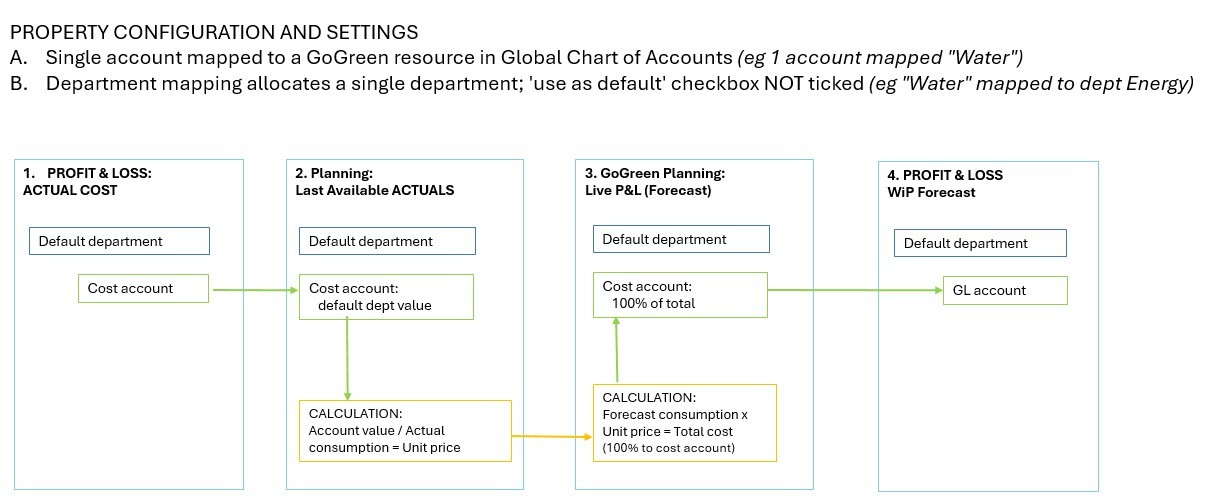
Image description: How cost accounts are used to calculate unit price where only 1 account mapped to a single department
1. Only the values in the single cost account in that department will be considered
a. Even if there are other costs for that account in other departments these will be ignored
2. Actuals are used for the same month (last available set of actuals) taking reported costs and reported consumption to calculate a unit price
a. Actual unit price equals actual cost divided by actual consumption
3. This unit price is used for the forecast month to calculate total cost of the predicted consumption
a. Forecast total cost equals forecast consumption multiplied by actual unit price
b. Cost allocated to the cost account (100%)
4. The cost account in the profit & loss module is updated with the value from GoGreen planning.
a. This account is locked in profit & loss module and any old calculations on the account will be ignored. It can only be updated from the GoGreen planning module.
b. If the same cost account shows in other departments in the Profit & Loss module, these will not be updated or locked
Worked example (single account, single department):
To forecast a value for July 2026, PMI looks at the actuals recorded in July 2025.
1. The cost account for Water in Energy department shows actual cost as NOK 100,000
2. The actual consumption for Water was 500,000 litres
So, the unit price for July 2025 was 100,000 ÷ 500,000 = NOK 0.2 per litre
3. The unit price for July 2026 will be forecast as “0.2”.
In the Live P&L the consumption for July 2026 is forecast as 400,000 litres
So, the forecast cost for July 2026 = 400,000 x 0.2 = NOK 80,000
As there is only 1 cost account this will also show as NOK 80000
4. In Profit & Loss, the value 80,000 will automatically show in the cost account for Water under the Energy department for July 2026 WiP forecast.
Example 2
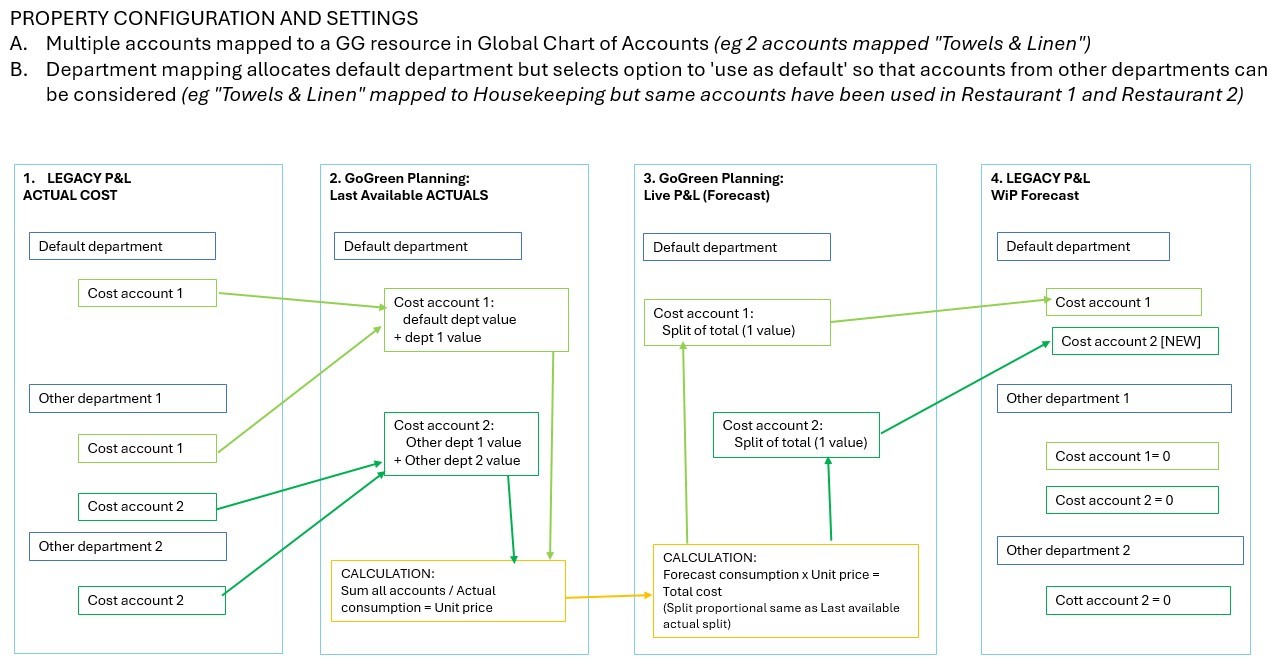
Image description: How cost accounts are used to calculate unit price where multiple accounts can come from several departments
1. The values in all mapped cost accounts in all departments will be considered
2. Actuals are used for the same month (last available set of actuals) taking all reported costs and reported consumption to calculate a unit price
a. Actual unit price equals sum all actual costs divided by actual consumption
b. PMI also calculates the proportion of the total that each account had in the actuals
3. This unit price is used for the forecast month to calculate total cost of the predicted consumption
a. Forecast total cost equals forecast consumption multiplied by actual unit price
b. Cost allocated into all cost accounts using the proportions from actuals; note that this is NOT split into the different departments
4. Each cost account in the profit & loss module is updated with the value from GoGreen planning in the default department only.
a. These cost accounts are locked in profit & loss module and any old calculations on the account will be ignored. It can only be updated from the GoGreen planning module.
b. A cost account could be added to the default department in Profit & Loss if it was in a different department in the Actuals but used by GoGreen Planning module
c. The same cost accounts in all other departments in the Profit & Loss module, will be updated with a value of ‘0’ and will also be locked.
Worked example for multiple accounts with costs in several departments:
To forecast a value for July 2026, PMI looks at the actuals recorded in July 2025.
1. The cost accounts for Towels & Linen in July 2025 are
a. Housekeeping, account 1 = NOK 50,000
b. Restaurant 1, account 1 = NOK 25,000
c. Restaurant 1, account 2 = NOK 0
d. Restaurant 2, account 2 = NOK 25,000
e. So total cost = NOK 100,000
f. Proportions are
- account 1 = (50000+ 25000) ÷ 100000 = 0.75 (75%)
- account 2 = (0 + 25000) ÷ 100000 = 0.25 (25%)
2. The actual consumption for Towels & Linen July 2025 was 50,000 units
a. So, the unit price for July 2025 was 100,000 ÷ 50,000 = NOK 2 per unit
3. The unit price for July 2026 will be forecast as “NOK 2”.
a. In the Live P&L the consumption for July 2026 is forecast as 40,000 units
b. So the forecast cost = 40,000 x 2 = NOK 80,000
c. Cost account 1 = 80,000 x 0.75 = NOK 60,000
d. Cost account 2 = 80,000 x 0.25 = NOK 20,000
4. In Profit & Loss, the cost accounts for July 2026 WiP forecast will show
a. Housekeeping Cost account 1 = 60,000
b. Housekeeping Cost account 2 = 20,000 (this may be a new account for this department)
c. Restaurant 1 Cost account 1 = 0
d. Restaurant 1 Cost account 2 = 0
e. Restaurant 2 Cost account 2 = 0
KPI target comparative version
The KPI target comparative version takes the ‘Target’ value from the GoGreen cockpit for each resource and shows the corresponding cost for that consumption using other values from the Live P&L version.
- Consumption: Target consumption from GoGreen cockpit
- Consumption per guest night: calculated as KPI target consumption ÷ Live forecast Guest nights
- Primary driver: Live forecast guest nights (same as Live P&L version)
- Unit price: Live P&L forecast unit price Note: If unit price in Live P&L is edited the KPI target unit price will also be updated
- Total cost: Target consumption x Live P&L unit price
Note that the KPI target section is only shown in the comparative section and cannot be edited in the GoGreen planning pages
Forecast versions
Forecast (or Budget) versions are submitted in the Profit & Loss module and are a snapshot of the Live P&L version at the time the version was created and submitted.
These are static versions that cannot be edited in GoGreen planning pages.
TIP: See article How to submit a GoGreen version for more information
Properties that do not use Profit & Loss
Properties that do not use Profit & Loss (PMI Planning) modules cannot have a cost calculated from historical data.
- Consumption is calculated in the same way as other properties.
- Cost is not calculated by PMI, but a Unit price can be manually entered into the table on the Cost page. A total cost is then calculated from this in the usual way.
- There are no cost accounts below the total row, but when the auto-scheduled forecast is submitted this will update the cost values in the GoGreen cockpit.
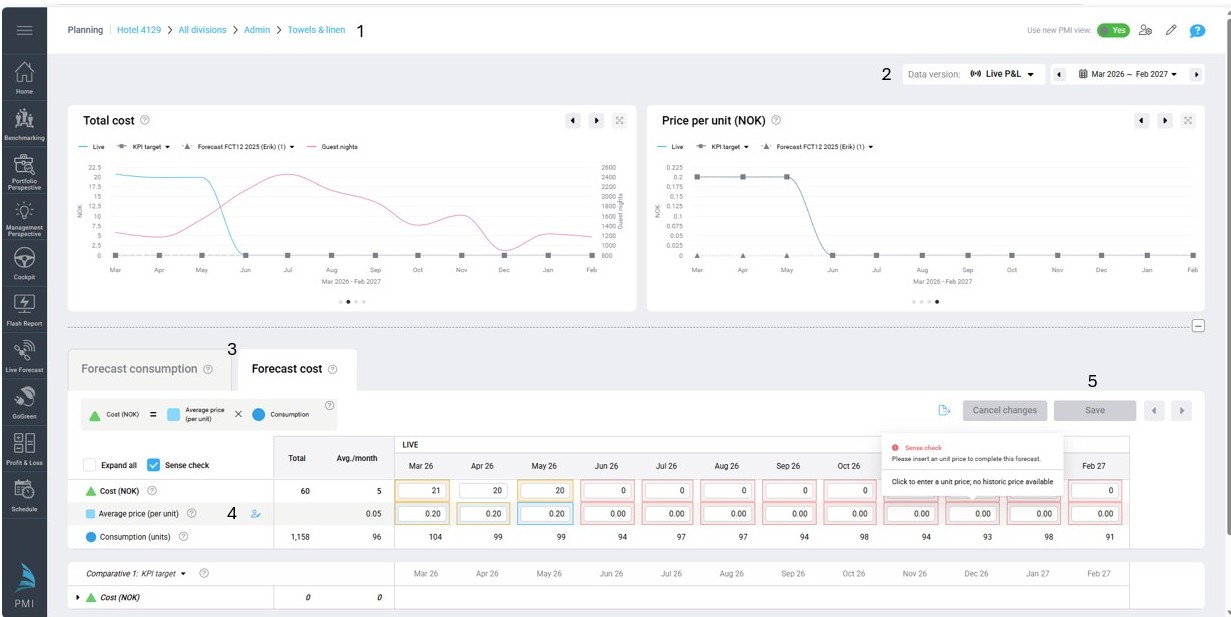
Image description: Cost tab in GoGreen planning with 0 unit price must be entered manually
TIP: See article How to do a GoGreen monthly forecast for more information
Cross-references
See the following articles for more information on the GoGreen planning module and user guides on how to set it up or use it :
Introduction to GoGreen planning
How to edit a GoGreen plan
Data tables explained
How to submit a GoGreen version
How to set up GoGreen planning for a property
Related features and modules
The GoGreen planning module takes data from:
- GoGreen cockpit (consumption: future Live forecast and past actuals)
- Live forecast module (guest nights: future Live forecast)
- Profit and Loss module (cost: past actuals; submitted future forecast)
- KPI target module (consumption: KPI target)
The GoGreen planning module passes data to:
- GoGreen cockpit (consumption and unit price for costs: future submitted Forecast)
- Profit and Loss module (cost: future WiP forecast)