
As a General Manager, you can now view a reliable, daily updated projection of month-end payroll costs in PMI. This new feature gives you better insight into month-end payroll costs—even before labor productivity issues become visible—so you can take corrective action early and stay on budget.
Why it matters:
Labor productivity can look healthy while payroll costs still exceed budget due to changes in average hourly rates.
By updating the projected rate every day, you can:
- Detect payroll risks earlier in the month
- Take corrective action sooner
- Make better-informed staffing decisions
Availability:
Everyone can use this feature, but it must be activated by d2o. Payroll data must be part of your imported data.
Please contact support@d2o.com for more information.
How it works:
- This functionality needs to be activated, and payroll data must be part of the imported data.
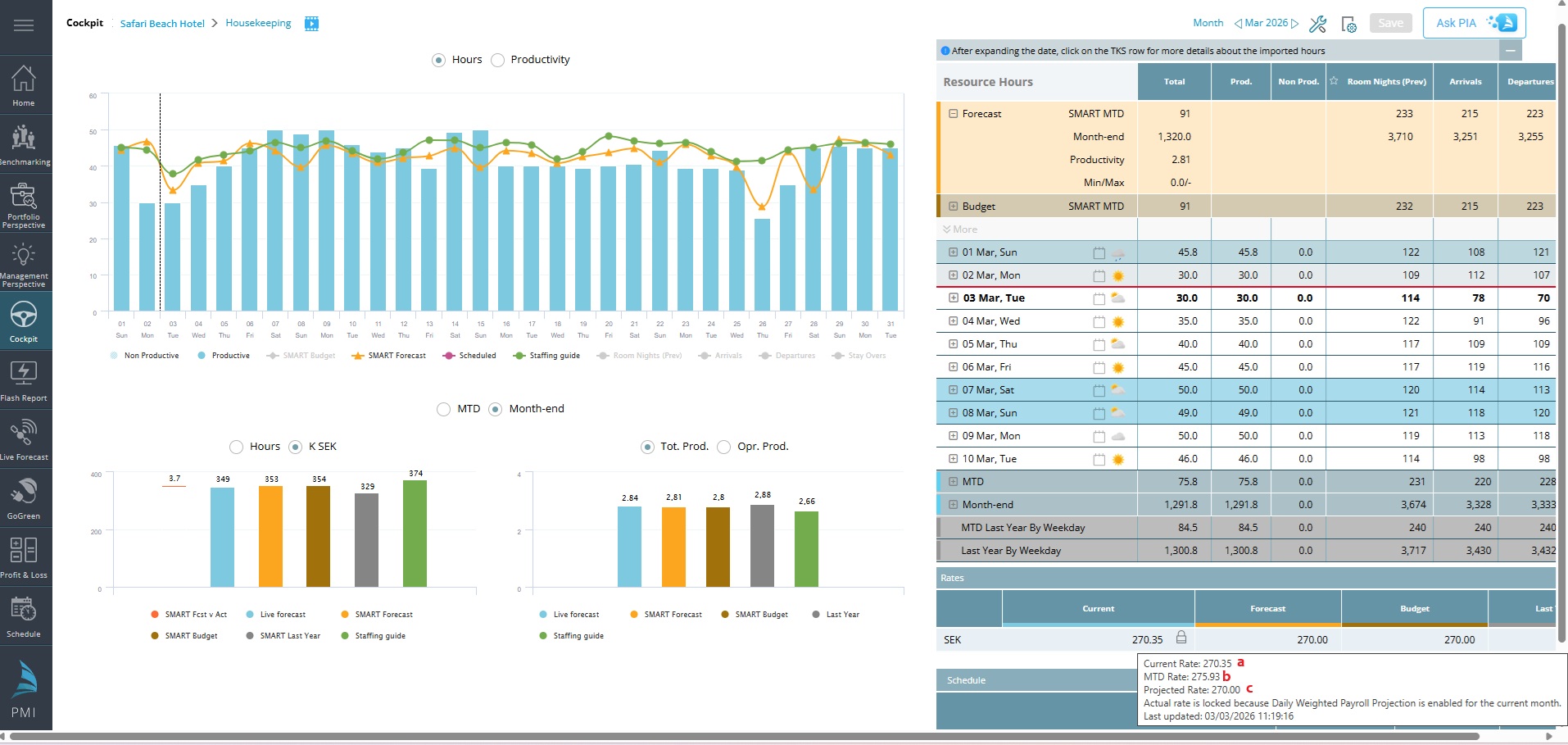
Image: A tooltip will show more details when hovering over the Current rate.
- When Daily Weighted Payroll Projection is enabled, PMI shows three payroll rates in a tooltip:
- Current Rate (a)
Based on the imported MTD actual average rate and forecasted rate for the remaining days of the month. (Formula: [MTD Rate x number of days until yesterday] + [Forecasted rate x number of remaining days], and divide this total by the number of the days of the month) - MTD Rate (b)
Based on actual payroll costs and hours imported so far in the month. - Projected Rate (c)
Forecasted payroll rate for the remaining days of the month.
- Current Rate (a)
- Rates update automatically with each payroll import, and the last update time is shown in the tooltip.
- A timestamp shows the last update.
Good to know:
- The Current Rate becomes locked for editing during the active month when this feature is enabled. A lock icon is visible.
- History months can be reset for manual editing, depending on period locking status, but the functionality will be removed for that month. Not recommended! See FAQ below.
- Manual adjustments are still allowed for future months.
The updated rate is reflected in Cockpit, Budget & Forecast, GM Daily Digest, Management, Portfolio, and Benchmarking views.
Cross-referencing:
FAQ:
Question: I have changed a past month to manual editing, but want to change it back to the ‘Daily weighted payroll projection’, can I do this?
Answer: Yes, you can. This needs to be done in the Budget & Forecast module with the following steps:
- Open the correct department & month in Budget & Forecast.
- The Labour cost will now have a robot icon, indicating that PMI will calculate the labour cost automatically.
- Click on this icon to change it to manual – this will re-activate the ‘Daily weighted payroll projection” function.
- You will need a new import with updated hours & payroll data for the calculation to run again.