
Summary
This article explains how to use PMI Prediction effectively through collaborative forecasting — a method that combines automated system forecasts with your own expertise. It covers when to review and adjust forecasts, how to interpret forecast details, and how frequently forecasts are updated. The goal is to support more accurate, informed decision-making by using both system intelligence and local knowledge.
Introduction
PMI Prediction can forecast business demand up to 16 months in advance. These forecasts provide a strong foundation, but your experience and insights are essential in refining them.
This is what we call collaborative forecasting — a partnership between system automation and your local knowledge.
To begin, we recommend reading the article PMI prediction explained in the Knowledge base, which provides a helpful overview. You’ll also find links to related topics if you need more detail.
How PMI Prediction supports your forecasting
PMI Prediction automatically generates forecasts based on historical booking data and patterns. In most cases, the forecast will be accurate for the majority of dates, but there will always be situations where manual adjustments are necessary.
When to manually adjust the forecast
There are specific types of dates that may require manual review and adjustment:
Special events
For major events such as concerts or festivals, demand and pricing can differ significantly from typical trends. If similar events haven’t occurred in the past, PMI may underestimate occupancy or ARR (Average Room Rate). In these cases, manual forecasting adjustments are recommended.
Public holidays
Public holidays often shift and may not have consistent historical patterns. Review these dates closely and adjust if necessary.
School holidays
Shorter school breaks (e.g., autumn holidays) can be difficult to forecast, particularly if your booking window is short. These dates may not generate reliable system forecasts until OTB (on-the-books) data starts to shift. Monitor these periods and adjust accordingly.
Closed periods
If your property has regular closure periods, PMI Prediction may detect and reflect this. However, if closures vary year to year, the system may not accurately predict them.
Forecasts more than 29 days ahead will show zero occupancy for recognized closures.
Within 28 days, if on the books exists and the system lacks historical reference, PMI may assume the property will be open.
For closures that don’t match historical patterns, we recommend manually adjusting the forecast.
Managing capacity changes
If your available rooms are changing (due to renovation, reopening, etc.), be sure to update the Available Rooms in PMI Prediction in advance. This allows the system to adjust and align future forecasts. Note that it may take a few weeks for the system to fully adapt to changes.
Understanding system logic
If the PMI prediction forecast differs from what you expect, you can view the forecast details by clicking the PMI Prediction value. This will display:
When the forecast was generated
Lead time and season
The model(s) used
Historical dates used for comparison, ranked by similarity
This helps you understand why the system produced a certain result.
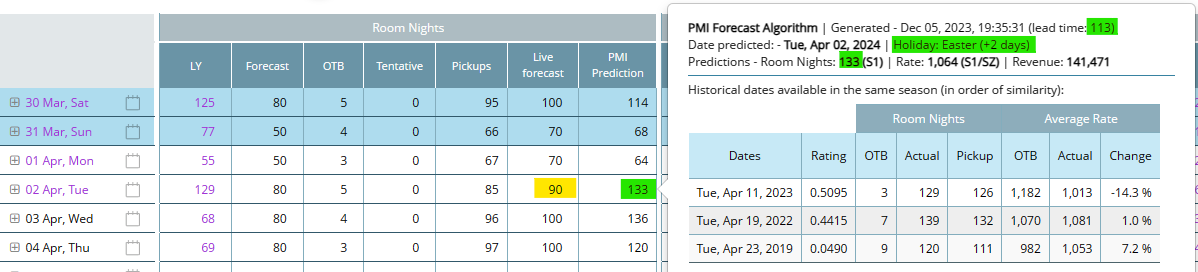
For example, if PMI Prediction suggests a higher forecast (green) and you have a lower forecast (yellow), reviewing the historical data will clarify why the system predicts a higher pickup.
Maintaining ownership of the forecast
Even with this level of system support, the final responsibility for the forecast remains with you. Collaborative Forecasting means using system data as a foundation while applying your own insights to ensure it reflects real conditions.
Forecast update frequency
PMI Prediction refreshes data based on lead time:
- 0–10 weeks ahead: Daily (after new OTB and daily actuals are imported)
- 11 weeks–6 months ahead: Weekly
- 6–16 months ahead: Every two weeks