Purpose of this article This article explains how Navigation and filters work on the NextGen planning pages in PMI. It helps you understand how the page controls what data you see, which version you’re reviewing, and how your personal view settings affect the Data...
explain
GoGreen planning charts explained: using charts to understand my forecast
Concept definition When I am reviewing my GoGreen forecast in GoGreen planning, I want to easily spot months that I might need to look at more closely so that my monthly forecast costs are as accurate as possible.  The charts are a visual aid to the data table to...
Sense check mode in new planning pages explained
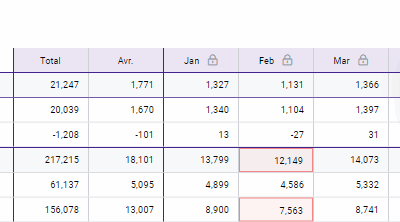
Purpose of Sense check When I am reviewing my Forecast values in the new planning pages, I want to easily see which values need further review. Sense check mode can help minimize errors in your data. It highlights obvious errors and values that seem extreme so you...
GoGreen plan values explained
Purpose GoGreen planning uses a number of sources from PMI and calculations to generate the forecast values in the planning page. This document gives a deeper explanation of where each value comes from and can be used to double check the data viewed on the page if...
Data table general explained
Purpose of this article This article explains how the Data table works in PMI NextGen planning pages. It helps you understand what the numbers mean, how totals and averages are calculated, and how comparative data supports better decisions. This article explains...