
This is the Opera Scheduler – Daily Forecast Report (M&E Revenue Forecast) guide.
In this article, you’ll learn how to configure and schedule a daily forecast report in Opera to export future M&E (meetings & events) revenue data to PMI. Whether you’re setting this up from scratch or verifying your existing setup, this guide gives you the clear steps to get your forecast flowing correctly.
Step 1
To get the on the books figures for M&E this report needs to be setup.
- It is called rep_daily_forecast
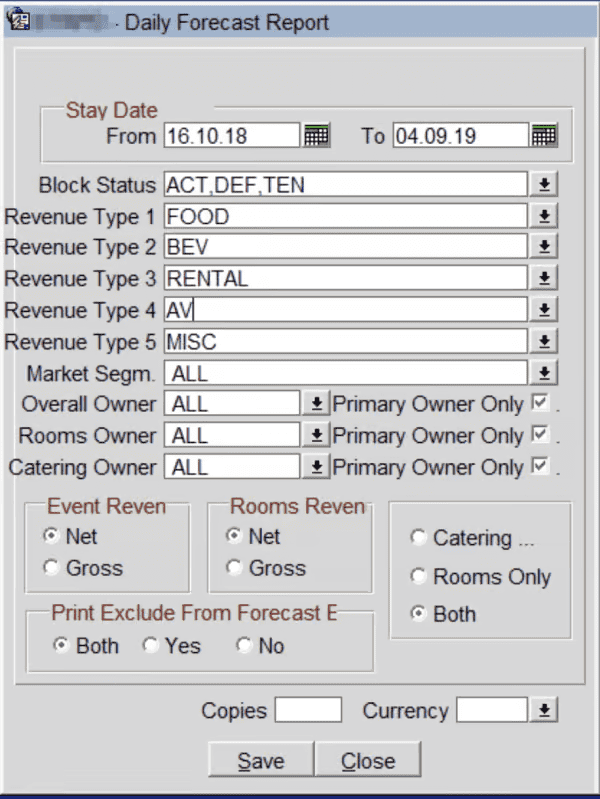
Follow the normal procedure according to the other reports but when this box appear do the following settings.
- Stay Date is today´s date.
- Block Status should be ACT, DEF and TEN
- Revenue Type 1 – Food
- Revenue Type 2 – Beverage/Drinks
- Revenue Type 3 – Rental/Room Hire
- Revenue Type 4 – AV
- Revenue Type 5 – Misc
This report should have the same setting as Res_forecast. +365 days
Cross-references
- Opera Scheduler setup
- Reservation Statistics 1 (Historical Room Nights and Guest Nights) Reservation statistics 1 guide
- Trial Balance – (Historical Revenue) Trial balance guide
- Reservation Forecast – (OTB Room revenue, Room Nights and Guest Nights) Reservation forecast guide
- Reservation History and forecast – (Arrival and Departures)Reservation history and forecast guide
- M&E Revenue forecast – (OTB M&E Revenue) M&E revenue forecast guide