
Purpose
The GoGreen planning page helps you review, forecast, and manage energy consumption and cost in your property.
Energy is one of the largest operational costs in many hotels. Managing it effectively helps you:
- Control operational costs
- Improve environmental sustainability
- Align energy usage with guest demand
The GoGreen planning page brings together energy consumption data, cost calculations, and forecast versions in one place. This helps managers understand how energy is used and how costs are expected to develop over time.
Context of GoGreen planning module
The cost data for GoGreen resources is shown directly into the Profit & Loss module, but the calculations behind these values can be reviewed in GoGreen planning.

Image description: The Profit & loss module with an example of Electricity account which shows costs from GoGreen planning page and a link to that page
In Profit & Loss, for all accounts that have been mapped to a GoGreen resource:
- Each month in the WiP forecast will be automatically populated (1) with the calculated costs from the GoGreen planning module.
- There will be an icon in the row, by the account name. If you wish to review the details behind the values, click this link (2) to open the GoGreen planning page for the related resource.
- If there are no issues with the data, the standard monthly submit process (3) can be followed in Profit & Loss module and will automatically include the GoGreen cost and consumption.
The calculations for the GoGreen costs are found in the GoGreen planning module. This can be accessed from:
- the link from Profit & Loss (as detailed in point 2 above)
- by navigating to Budget and Forecast and selecting the department ‘GoGreen’ (see image below).
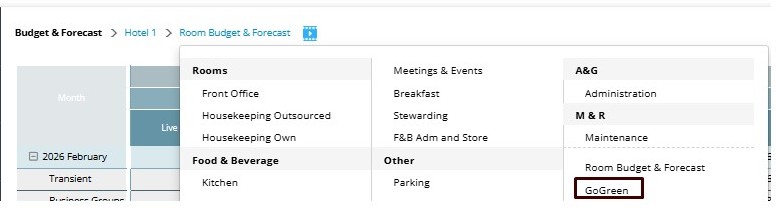
Image description: From Budget/Target & Forecast menu, click GoGreen option to open GoGreen planning page
Each GoGreen resource will have its own planning page in the GoGreen planning module:
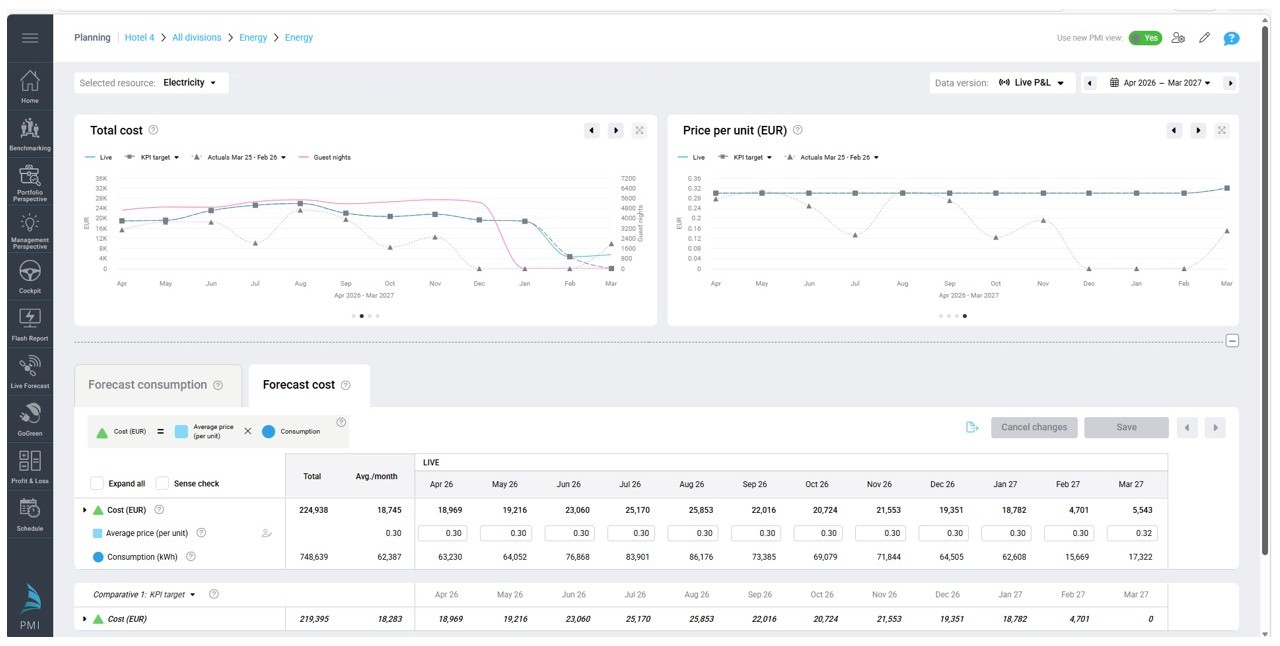
Image description: The GoGreen planning page showing Electricity consumption and cost data for the next year by month.
Key capabilities
The GoGreen planning page provides several capabilities to help you review and manage energy costs.
Resource-based planning
Energy resources (such as electricity or heating) are organised by department, allowing you to review each resource separately.
Consumption and cost visibility
The page shows both energy consumption and cost values. This helps you understand how operational activity affects energy
Flexible cost forecasting
The page allows you to set rates for resources (eg energy) in different ways depending on the resource:
- Pricing based on rates for last available actuals (typically previous year) with option to add a % variance
- Fixed rate
Multiple data versions
You can switch between different data versions, such as:
- Live P&L (current forecast based on Live forecast consumption)
- Forecast versions submitted during planning cycles
- Budget or target versions
Comparative analysis
Comparative data allows you to review current expectations against previously submitted plans or historical actuals.
Flexible time periods
You can change the selected date range to review past actuals as well as future forecasts.
User roles and responsibilities
Several roles in a hotel use the GoGreen planning page to monitor and manage energy resources.
General Managers (GM)
- Review overall energy cost performance
- Compare forecasted costs with budget or targets
Heads of department
- Review energy consumption related to their operational area
- Validate forecast values before submission
- Identify unusual cost patterns or consumption changes
Finance or operations teams
- Review forecast versions during planning cycles
- Compare energy cost expectations with historical data
- Support cost control discussions with department managers
Common use cases
The GoGreen planning page supports several common operational scenarios.
Reviewing expected energy costs
A General Manager reviews the Live P&L version to understand expected electricity costs for the upcoming months.
Comparing forecasts with previous plans
A finance manager compares the current forecast version with the submitted budget to understand cost changes.
Monitoring energy consumption trends
A department head reviews monthly electricity consumption to identify unusual increases in usage.
Validating planning assumptions
During forecasting, managers review energy cost projections to ensure they align with expected hotel activity levels.
Cross-references
See following articles for further information about this module, explanation of its features and step to step guides:
Data tables in planning pages explained
Navigation in planning pages explained
How to do a monthly forecast for GoGreen
Related features and modules
The GoGreen planning page connects to several other PMI features:
- GoGreen cockpit – Live forecast consumption comes from the GoGreen cockpit
- Profit & Loss module– Energy and other GoGreen costs are updated directly into the WiP forecast ready for the monthly forecast or annual budget cycles