This enhancement is for Room forecasts and profit centres with covers using PMI Prediction and have the pickup calculator enabled in the tools. When a forecast date is changed from Auto to Manual, ARR pickups are now reset to zero to avoid incorrect values being...
live forecast
Live Forecast – Improvements and new settings in Tools
Several improvements and new tools were recently added to Live forecast to improve prediction handling and forecast reset functionality. 1. Update Live forecast to PMI prediction when changing from manual to auto This improvement applies to: All Rooms Live Forecast...
Rooms Live forecast – Guest nights factor improvements
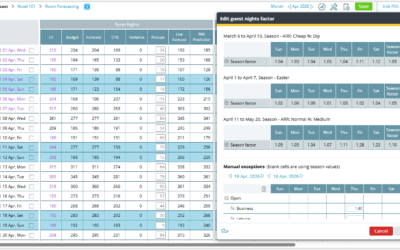
Edit Guest nights factors Improvement Guest nights factors are now managed in a single tool, ensuring consistent guest calculations across Live forecast, Budget & Forecast, and Revise forecast. Introduction The Guest nights factor logic in Live forecast has been...
How to change available rooms in PMI
If you need to change the number of available rooms in PMI, do it in Live Forecast. How to do it Open Live Forecast Go to Tools Select Available Rooms Enter the updated number of rooms for the relevant dates Save Use this when rooms are temporarily unavailable, for...
Why are some numbers purple, blue, red or orange (amber) in the Live Forecast?
Live Forecast Color Legend (forecast table) Note: This color legend applies only to the values shown in the Live Forecast table. Other views in PMI, such as Sense Check or alert panels, may use similar colors with different meanings. Colors in the Live Forecast table...
Live Forecast does not match OTB
If Live forecast shows a large gap versus OTB (e.g. OTB = 97 RN and Live = 37 RN), first check the update method. Go to: Live forecast → Tools → Configuration settings Under Live forecast update method, verify: Auto: Updates when new external file is imported Auto:...
How manual pickups affect Food Revenue when F&B Live Forecast runs on Total level
When the F&B Live Forecast is configured to forecast Total Revenue, any manual pickups are applied to the total Live Forecast amount for the profit center. The pickup itself is not food-specific. How Food Revenue is calculatedFood Revenue is derived from Total...
How to check if forecasts have been submitted for the next 3 months
If you want to confirm whether all hotels have submitted their forecasts for the next three months, the steps depend on your access level. If you have access to the Planning module: Open the Live Forecast module Use the Submit Several or Approve Several options under...
How to confirm that forecast targets are correctly applied
To ensure forecast targets are properly set and reflected in PMI — whether for a coaching session, planning review, or operational check — follow these quick steps: Check the Budget & Forecast Module Go to Budget & Forecast Select the relevant month Confirm...
Live forecast shows zero despite formula setup
Issue: Some accounts in the Live Forecast column show 0 even though formulas exist. This is sometimes seen when: The formula appears present but doesn’t calculate Other months (e.g., June) work correctly while the current month (e.g., May) doesn’t Possible Causes:...