Live Forecast Color Legend (forecast table) Note: This color legend applies only to the values shown in the Live Forecast table. Other views in PMI, such as Sense Check or alert panels, may use similar colors with different meanings. Colors in the Live Forecast table...
Geson Perry
Live Forecast does not match OTB
If Live forecast shows a large gap versus OTB (e.g. OTB = 97 RN and Live = 37 RN), first check the update method. Go to: Live forecast → Tools → Configuration settings Under Live forecast update method, verify: Auto: Updates when new external file is imported Auto:...
Why does TKS mapping have proportional cost rates, and what do they affect?
Problem You saw an option in the Timekeeping System (TKS) mapping to assign different proportional cost rates and wondered: “If I pay someone at 20% of the normal rate, why can’t I reduce their hours for RevPOLU / PMI?” Explanation In PMI, hours and cost are handled...
Why can’t I edit a calculation in P&L Planning?
If you cannot edit a value or formula in P&L Planning, the reason is usually one of the following: 1. The account has a Source Definition If you see a calculator icon on the account line, the value is controlled by a Source Definition. You cannot type directly in...
PIA chat powered by GPT-5.1 is now available to all users
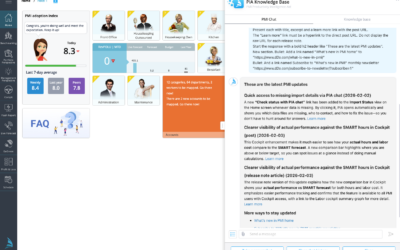
We’re excited to announce that PIA, your PMI chatbot, is now available to all users! You can access PIA Chat anytime via the “Ask PIA” icon in the top-right corner of your screen. Powered by GPT-5.1, PIA delivers faster, smarter, and more context-aware answers to help...
What’s new in PMI – Release notes
We’ve introduced a new home for PMI release notes. Starting with 2026 releases, all updates are now published in this new, improved format to make it easier for you to stay informed about the latest features, enhancements, and improvements. Release notes from 2025 and...
PMI Views
PMI views are organised by modules, as they appear in the main navigation menu. Some modules are always visible, while others depend on activated features, user roles, or chain configuration. The same view name (for example Cockpit) can exist in different modules and...
Quick access to missing import details via PIA chat
A new link has been added to the Import Status view on the Home screen when data is missing. By selecting “Check status with PIA chat”, PIA will open and automatically display: The missing data files Relevant contact information Guidance on how to resolve the issue...
How manual pickups affect Food Revenue when F&B Live Forecast runs on Total level
When the F&B Live Forecast is configured to forecast Total Revenue, any manual pickups are applied to the total Live Forecast amount for the profit center. The pickup itself is not food-specific. How Food Revenue is calculatedFood Revenue is derived from Total...
Why CoE screenshots can look “empty” when you inspect them
If you’ve noticed that screenshots captured in CoE appear blank/empty when you open or inspect them, this is expected behavior for Power BI views. Power BI visuals are often rendered dynamically (client-side), and the “image” you see on screen isn’t always stored as a...