
What’s new?
Pickup Statistics has an updated view that makes it easier to understand how your On the books (OTB) figures develop over time. The redesigned page introduces a clearer overview of booking performance, with summary cards, booking insights, and a booking curve to help you identify important changes and investigate booking patterns.
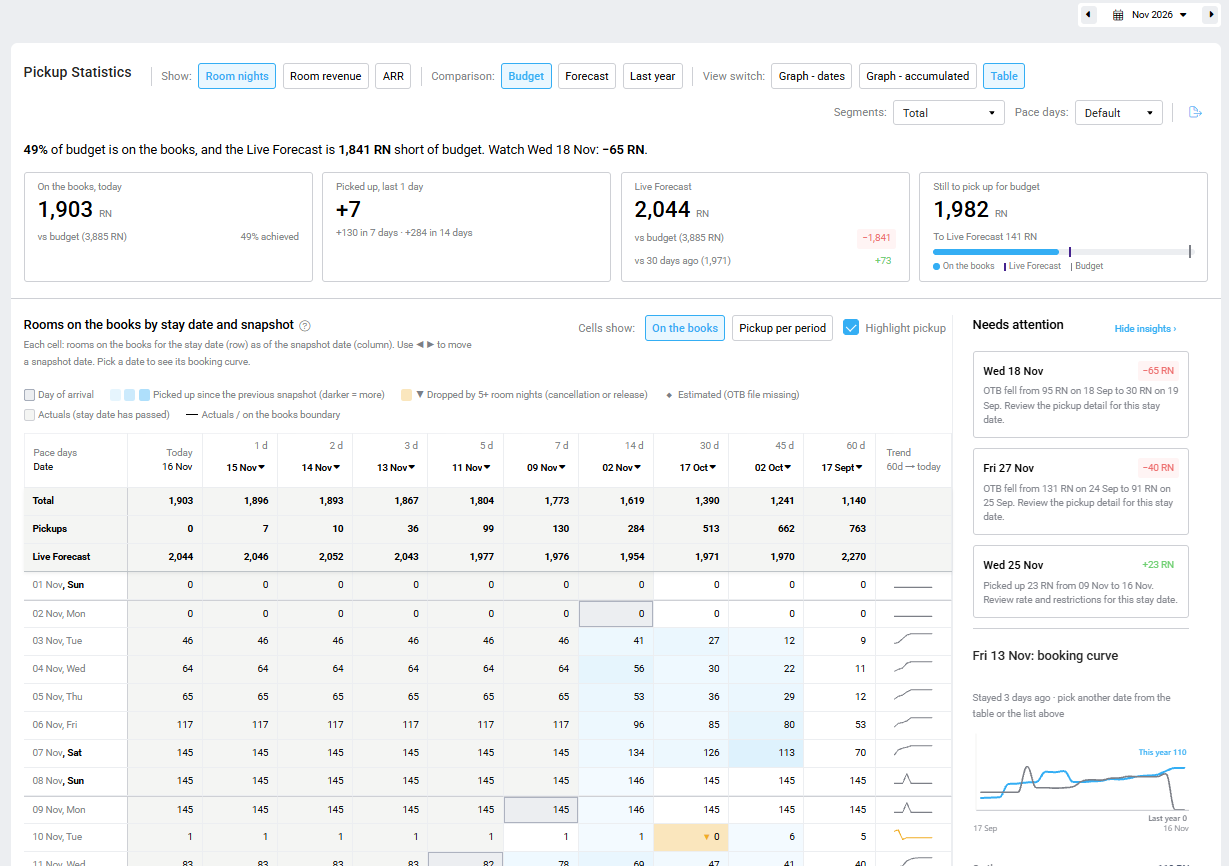
You can switch to the old, legacy view by using the toggle: Use new PMI view. This will be open for a limited time.
Why is this useful?
- Get a quicker overview: Summary cards highlight your current booking position, pickup, Live Forecast, and what is still needed to reach your target.
- Identify dates that need attention: The Needs attention panel highlights significant booking movements and changes in forecast.
- Understand booking patterns: Explore individual stay dates using the booking curve and compare this year’s position with last year.
- Investigate performance: Switch between measures, comparisons, and display options to better understand where booking changes are coming from.
- Make informed forecast decisions: Use the booking insights to review your expectations and make adjustments in Live Forecast.
What has changed?
- Updated interface: A redesigned page brings the booking information and insights together in one view.
- Summary information: A summary sentence and four cards provide an overview of booking performance.
- Needs attention: A new panel highlights significant booking movements and dates that may require further investigation.
- Booking curve: Select a stay date to explore how its booking position has developed over time.
- Improved table: Review booking positions across snapshot dates, with options to display On the books or Pickup per period and highlight booking movements.
- Flexible comparisons: Compare performance against Budget, Forecast, or Last year.
- Additional export options: Export your information to Excel, PDF, or Google Sheets.
Learn more
Read the updated Pickup Statistics overview and How to use Pickup Statistics articles to learn more about the available features and how to use the page.