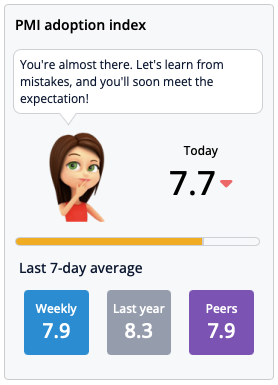

The Index — formerly called the PMI Index and now officially known as the PMI Adoption Index—measures how effectively a property or department uses PMI to manage resources and improve productivity. A score of 8.0 is good, and 8.5 or above is considered excellent.
Common Issues and what to do:
- Score Not Updating? The index recalculates automatically every night after midnight CET. → If you’ve made changes or improvements, check back the next day to see if the score has been updated.
- Score Seems Low? Use the Index Dashboard to drill down by department. → Focus on areas with either low scores or high weighting — that’s where your improvements will have the biggest impact.
- Confused by the Weighting? Not all departments are treated equally in the score. → The index is weighted based on department size, revenue, and hours worked — so larger departments influence the overall score more.
Index not showing?
- Access rights: You might not have permission at the current view level.
- Missing data: Hours, revenue, or plans may be incomplete or missing.
- Recent changes: Wait until after midnight CET for updates to apply.
- Wrong view: Ensure you’re at a department, property, or chain level where the index is calculated.
- System issue: If none of the above applies, contact support for help.