
Edit Guest nights factors Improvement
Guest nights factors are now managed in a single tool, ensuring consistent guest calculations across Live forecast, Budget & Forecast, and Revise forecast.
Introduction
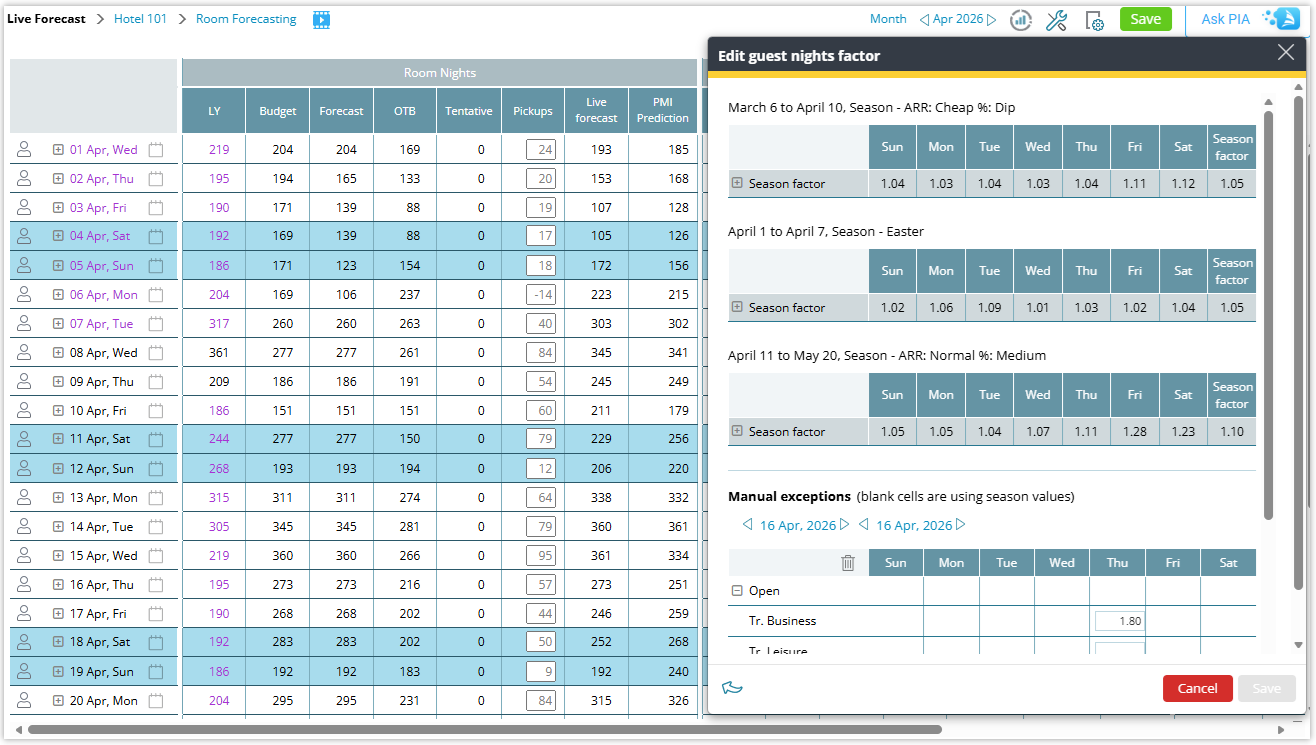
The Guest nights factor logic in Live forecast has been redesigned to remove inconsistencies, eliminate conflicting editing paths, and provide a clearer link between room nights and guest nights. The updated structure ensures that guest night calculations remain aligned with seasons, weekday patterns, and manual exceptions.
What has changed
Guest nights factors follow seasons by default
Season-based weekday factors are automatically applied for all properties, with a clear display of the seasons covering the selected period.
Direct editing removed from Live forecast
Guest night values can no longer be edited directly. Users are guided to the Guest nights factor tool to manage changes.
Updated Guest nights factor tool
The tool clearly displays the seasons that apply to the selected period together with any manual exceptions. Historical periods are displayed as read-only.
Manual exceptions improved
Manual overrides are now managed entirely within the Guest nights factor tool and always take priority over seasonal values.
Budget & Forecast alignment
Guest nights are no longer editable in Budget & Forecast. Monthly guest nights always follow the guest nights factors defined in Live forecast.
Revise forecast alignment
Revise forecast now uses the same factor logic as Budget & Forecast, ensuring guest nights remain consistent with room nights and saved Guest nights factors.
Copy to Live forecast improvement
Copying room nights now automatically copies guest nights.
Updated tooltips
Tooltips clarify how On the Books (OTB), pickup and Live forecast guest nights are derived.
Guest nights view fully calculated
Guest nights are now fully calculated values. Pickup guest nights are derived from room nights pickup multiplied by the Guest nights factor, resulting in an automated guest nights ratio.
Good to know
- Default for all future months is always based on season.
- During implementation, previously defined non-season values are converted into manual exceptions.
- Guest nights are always calculated from room nights.
- Editing room forecast will update guest forecast automatically.
- Guest view is now fully calculation-driven.
Why this matters
These improvements provide a single source of truth for Guest nights factors, prevent calculation conflicts, and ensure more reliable guest forecasts across PMI forecasting modules.
Related articles
Rooms Live forecast – Guest nights factor explained
Live forecast settings – Copy to live forecast
Live forecast settings – Revise forecast/budget