
What’s new
Food revenue can now be configured at segment level within a profit center.
This enhancement allows each segment to have its own food revenue settings and calculation method, providing greater flexibility for operations that forecast Food and Beverage revenue separately.
Why is this useful?
- Configure food revenue independently for each segment.
- Use different food revenue calculation methods for different segments.
- Automatically identify segments that are configured as food segments and lock them at 100% food revenue.
- Improve food revenue forecasting for operations with multiple revenue streams.
- View and manage food revenue percentages directly in Budget & forecast.
What has changed?
Live forecast settings
When food revenue is enabled for a segmented profit center:
- Food revenue can be enabled or disabled per segment.
- Each segment can use its own calculation method.
- Food revenue is calculated separately for each segment and combined into a total for the profit center.
- Segments configured as food segments in the property setup are automatically enabled and fixed at 100% food revenue.
Note: During deployment, any existing Food Revenue calculation method configured on the profit center is automatically applied to all segments.
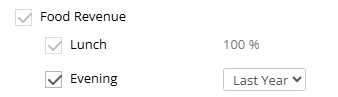
Food revenue settings showing segment-level configuration.
Budget & forecast
Food revenue is now managed using a Food % value.
- Food % is displayed in Budget & forecast.
- Food revenue can be viewed on total level or segment level, depending on forecasting setup.
- Food revenue values are automatically calculated using the configured food revenue settings.
- Food % can be edited when a month is switched to Manual mode.
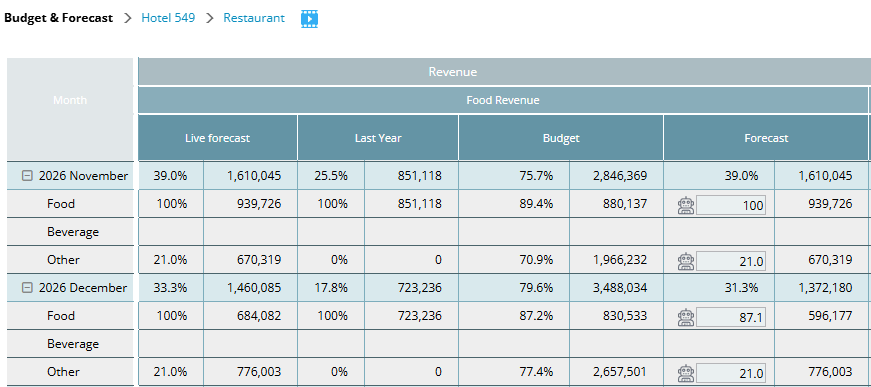
Image description: Budget & forecast showing the Food % column.
Availability
This is only visible to users with appropriate access rights.
Learn more
For detailed information about configuring food revenue, calculation methods, food segments, and Budget & forecast behavior, see:
Configure food revenue by segment