
What’s new
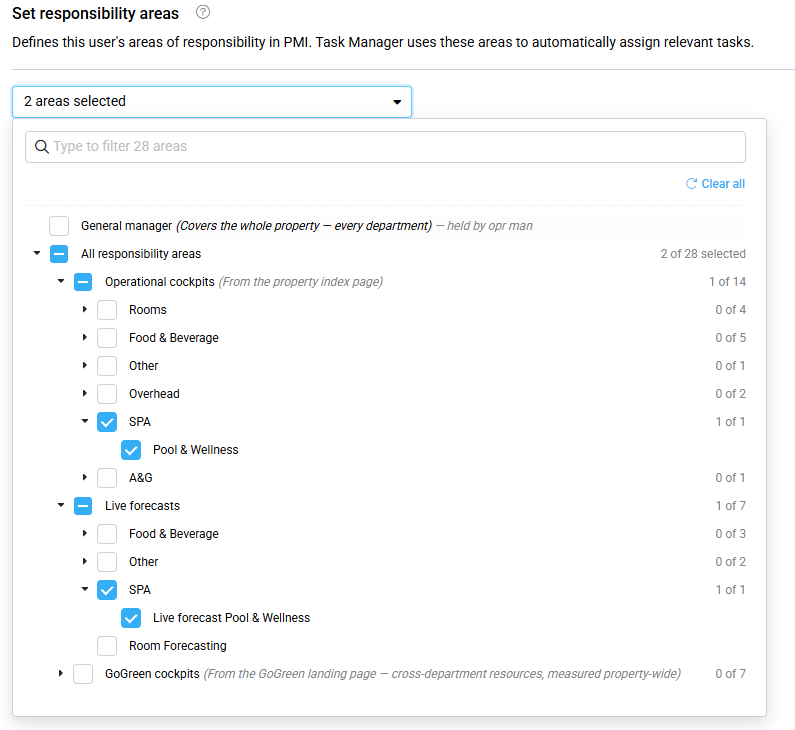
User administration has been enhanced to let you define a user’s PMI responsibility areas at the hotel. These areas identify what the user is responsible for, such as an operational cockpit, live forecast, or GoGreen resource.
The responsibility areas will be used by the upcoming Task manager enhancement to automatically assign relevant tasks to the right Head of Department (HOD).
Why is this useful?
- Prepare for Task manager: Set up responsibility areas so PMI can identify the right HOD for each task.
- Clear ownership: Each responsibility area can have one owner at the hotel.
- Easier handovers: When responsibility changes, you can hand an area over directly to another user.
- Better user information: You can also record where a user works using the new Works in field and get suggestions for commonly used job titles.
What has changed?
- Added PMI responsibility areas to the Add new user and Edit user screens.
- Responsibility areas are grouped into:
- Operational cockpits
- Live forecasts
- GoGreen cockpits
- General manager is handled separately as a hotel-wide position, with its own handover and Take over on date.
- Added Works in to record the division or department where the user works.
- Responsibility areas can be handed over when someone takes over a role or responsibility.
Availability
The enhancement is available in User administration for users who have permission to add or edit users. Responsibility areas are configured per hotel.