
What the Row Colors Mean in the Account Mapping Table
The Account Mapping Table uses color indicators to help you quickly understand the status of each row and determine whether any action is required. PMI does not automatically map new accounts; however, it may automatically remap existing mapped accounts when hierarchy changes occur.
Below is an overview of what each color represents and how to troubleshoot them.
Red Rows (Action Needed)
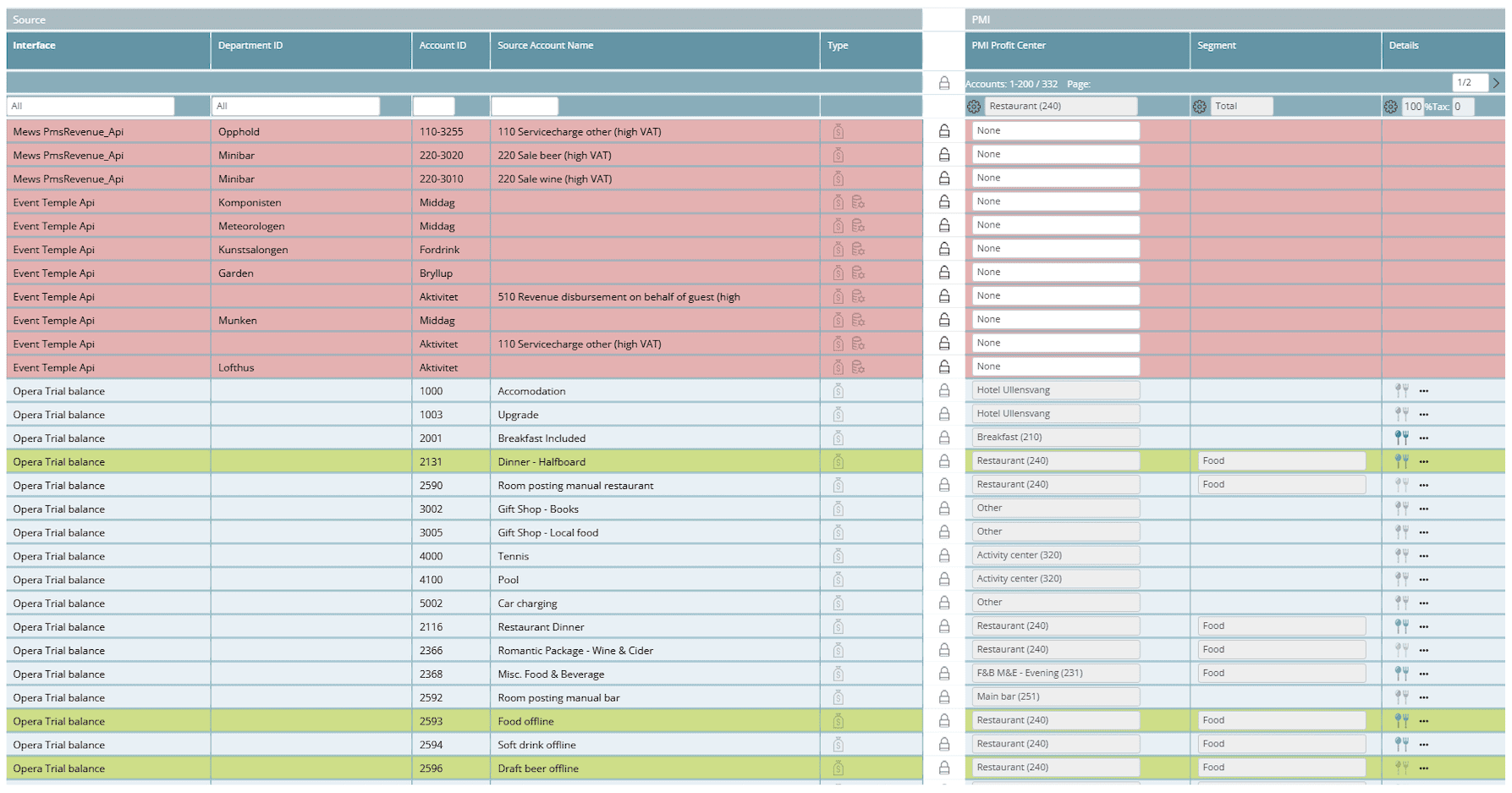
Red highlights indicate unmapped or incomplete mappings.
Typical reasons:
- The segment or profit center is missing.
- The source account has not been assigned.
- A hierarchy change made the old mapping invalid.
What to check:
- Make sure a valid PMI Profit Center and Segment are selected.
- Review any recent hierarchy changes (segments added/removed).
Blue Rows (Mapped Manually / Stable)
Blue rows represent valid manual mappings.
- There is no issue.
- The mapping has been reviewed and saved.
- No hierarchy changes affect the mapping.
These rows are considered “complete” and do not require action.
Green Rows (Automatically Remapped)
Green rows show accounts that PMI remapped automatically due to a change in the hierarchy.
Typical triggers:
- A segment was added or deleted.
- An old segment no longer exists.
- Profit centers were reorganized.
- A new version of the hierarchy was imported.
PMI attempts to preserve continuity by remapping the account to the nearest valid equivalent.
Troubleshooting tip:
If an auto-remapped row looks wrong:
- Verify the latest hierarchy update.
- Reassign the correct PMI Profit Center or Segment manually.
- Save the mapping.
- If the incorrect auto-mapping keeps reappearing, report it to support (usually indicates an upstream hierarchy mismatch).
Grey Rows (Locked or Ignored)
Grey rows can appear for two different reasons:
1. System-controlled (locked):
- These mappings come from certain automated imports.
- The row cannot be edited by the user.
- A lock icon is usually visible.
2. User-set as “Ignored”:
- Users can manually mark a row as ignored when the source account should not be mapped into PMI.
- This allows you to keep the row visible for reference while explicitly excluding it from processing.
- Ignored rows remain grey but not locked, and can be reverted by the user at any time.
Summary
Red
- Meaning: Missing or invalid mapping
- Action: Yes
Blue
- Meaning; Manually mapped and valid
- Action: No
Green
- Meaning: Auto-remapped after hierarchy change
- Action: Optional (verify correctness)
Grey
- Meaning: Locked by system or manually ignored by user
- Action: Only if unintended