
KPI Targets now support budget data as a comparative and include simplified import/export functionality with more flexible templates, formatting support, and expanded reference options.
What’s New
Budget data is now available in the KPI Targets module and can be used when setting KPI targets.
Note: The Budget option is disabled by default and can be enabled for your chain. Contact support@d2o.com for more information.
- Budget can be used as an additional comparison option on dashboard pages via Personal View options.
- The system uses the last submitted budget.
- Revenue and cost are sourced from the P&L using Global Category definitions.
- Hours and Guest Nights/Room Nights are sourced from R&P.
- Budget data is shown as calculated KPI values for the selected period.
- The Set KPI Targets page includes additional reference options that can be copied into targets when a particular data version is a good starting point for target setting.
You can choose between:
-
-
- LTM (Last Twelve Months actuals / rolling actuals)
- The last two calendar years of actual data
- The last two submitted forecasts
- The last submitted budget (if enabled)
-
The copy option uses:
-
-
- Annual averages when viewing the full year
- Monthly values when expanded to monthly view
-
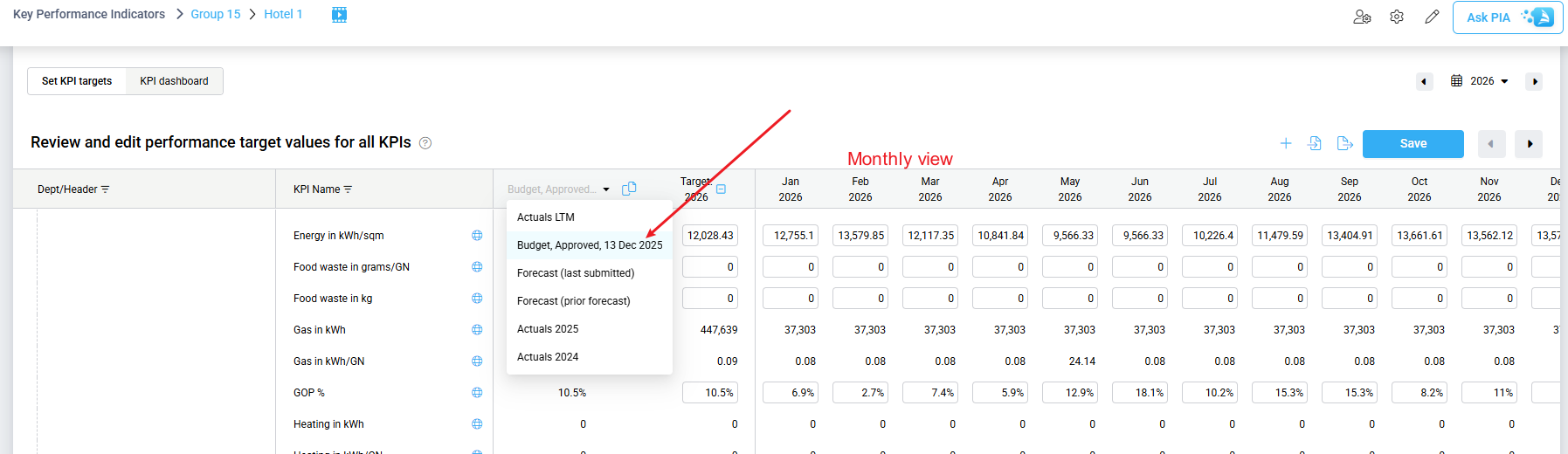
Image: Copy KPI targets from Budget in monthly view
Import/Export Improvements
Several improvements have been made to simplify the KPI target import and export process:
- Exported files from the setup page can now be used directly for import.
- Import is no longer case sensitive and ignores extra spaces in names.
- Property Code can be used instead of Property Name (the system will use the code if valid; otherwise, it will use the name).
- Percentage targets can be entered as 40 or 40%.
- The same template is now used for monthly and annual targets (vertical format).
- Export files can include additional reference information such as cost drivers and hours/productivity to support target setting.
Benefit
These improvements make it easier to set meaningful KPI targets, whether you choose to copy from a budget or forecast dataset that already reflects your expectations for the coming period, or prefer to export a file containing historical performance and department driver information, adjust the targets, and upload the updates in a single bulk import.
We also recommend reviewing the new KPI Display Settings enhancement to remove KPIs that are not relevant for your property before setting targets for the KPIs that are most important to your operational focus.