
Import status settings in PMI have been improved to provide clearer visibility into interface activity and expected imports.
The update helps users identify missing or delayed imports more easily and improves management of interface settings across properties and chains.
Why is this useful?
- Improve visibility into interface activity
- Detect missing or delayed imports more accurately
- Improve consistency across properties using shared settings on chain level
- Better control of expected arrival times for daily or monthly files
- See all active and inactive interfaces in one list (Chain settings)
What has changed?
Improved visibility and monitoring
- Added support for Hourly, Daily, and Monthly import monitoring
- Added a new Status column showing whether interfaces are Active or Inactive from SIT
- All interfaces, including inactive interfaces, are now visible in the settings view
- Improved handling of missing imports and imports where PMI data was not updated correctly
Enhanced import timing settings
- Added enhanced Expected file arrival settings with:
- Daily expected arrival times
- Monthly arrival scheduling by day and time
- Added a new Data offset setting to define how many days back or forward data is expected
Improved settings management
- Improved Chain settings synchronization and inheritance logic
- Added new filters and tooltips for easier navigation and visibility
- Removed the legacy “Track status” setting and replaced it with improved logic
- Only users with d2o access can edit settings; other users have view-only access
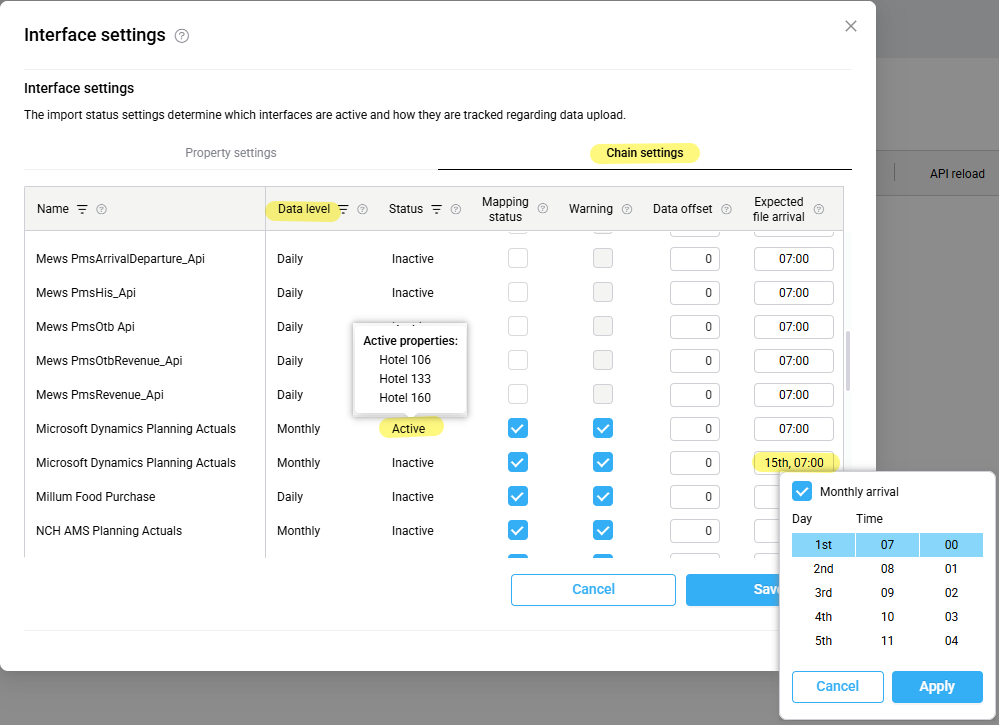
Image: Some of the improvements indicated in the settings screen
Availability
- Import status settings on both Property and Chain level are view-only for hotel users.
- To request changes or updates to these settings, please contact d2o Support.
Where to find it
- Go to: PMI > Import status > Settings
Good to know
- Property-level settings still override Chain settings where configured
- Monthly interfaces can be configured with a specific expected day and time
- Warning messages are now more closely aligned with expected import timing and data availability