
Benchmarking now supports the same primary cost driver as the Cockpit in the Productivity Displays
Benchmarking Productivity Setup sources has been updated to use the same primary cost driver as the Cockpit. This makes it easier to keep your performance analysis consistent across PMI.
What’s new?
New option to select the Cockpit’s primary cost driver as the cost driver in the Productivity displays
What changed?
The cost driver in the Productivity setup are no longer limited to the direct values of the selected department type, but the primary cost driver configured in the Cockpit can be reused in the Benchmarking Productivity setup. This makes analysis clearer and easier to maintain.
How to use it:
You will find the setting in the ‘Setup Sources’ from the Tools menu. The Cost Driver drop-down menu now has an option at the bottom of the list: ‘Primary Costdriver’.
Selecting this option will use the primary cost driver from the Cockpit.
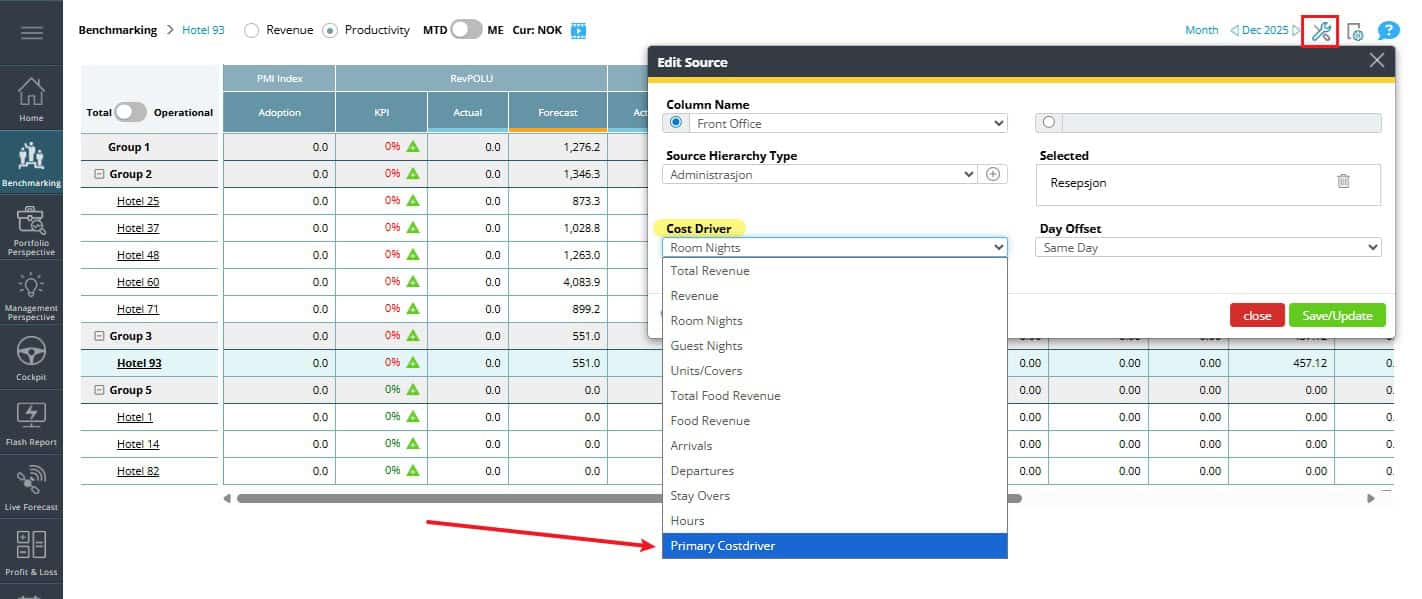
Image description: The new option to choose primary cost driver is found at the bottom of the dropdown list
Availability:
This setting is available for all users with access to the ‘Setup Sources’ in tools which include Management Team and Head Office Representatives (users with HQ roles)