
Copying account data from reference
This function allows users to copy account data—such as forecast figures or formulas—from one department to another within the Profit & loss module. It is especially useful when setting up a new department, aligning similar outlets, or applying standard structures across properties.
Intended users:
Department managers, controllers, or anyone responsible for managing the Profit & loss forecast in PMI.
Access required:
Access to the Profit & loss module and Tools > Copy Account Data functionality. User must have permission to view and edit both the source and destination departments.
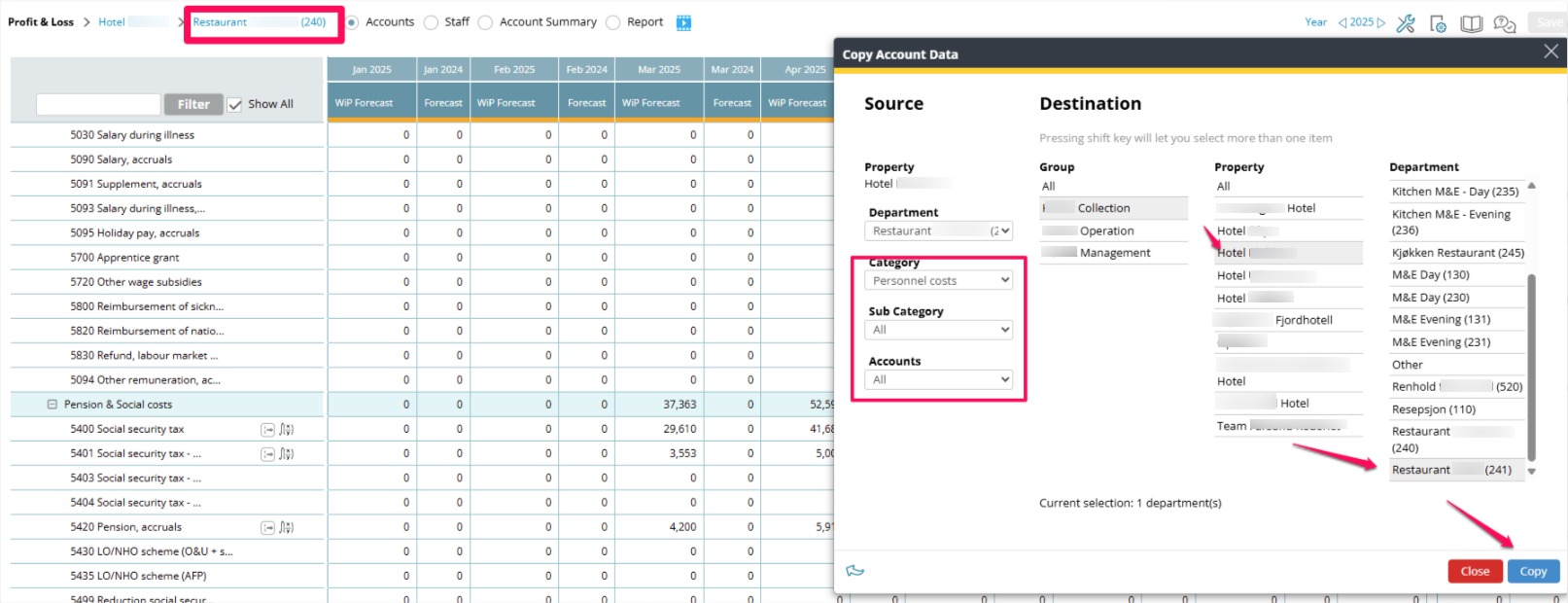
To copy from reference, go to the Profit & loss page.
- Verify that you are in the right department with the correct formulas to copy from.
- Open Tools.
- Click Copy Account Data.
- Under Source, choose the department of accounts you want to copy from. All sub categories or a single account can be selected.
- Select the correct hotel and department to copy to.
- Click Copy.
To copy from reference, go to the Profit & loss page.
- Verify that you are in the right department with the correct formulas to copy from.
- Open Tools.
- Click Copy Account Data.
- Under Source, choose the department of accounts you want to copy from. All sub categories or a single account can be selected.
- Select the correct hotel and department to copy to.
- Click Copy.