
What’s new
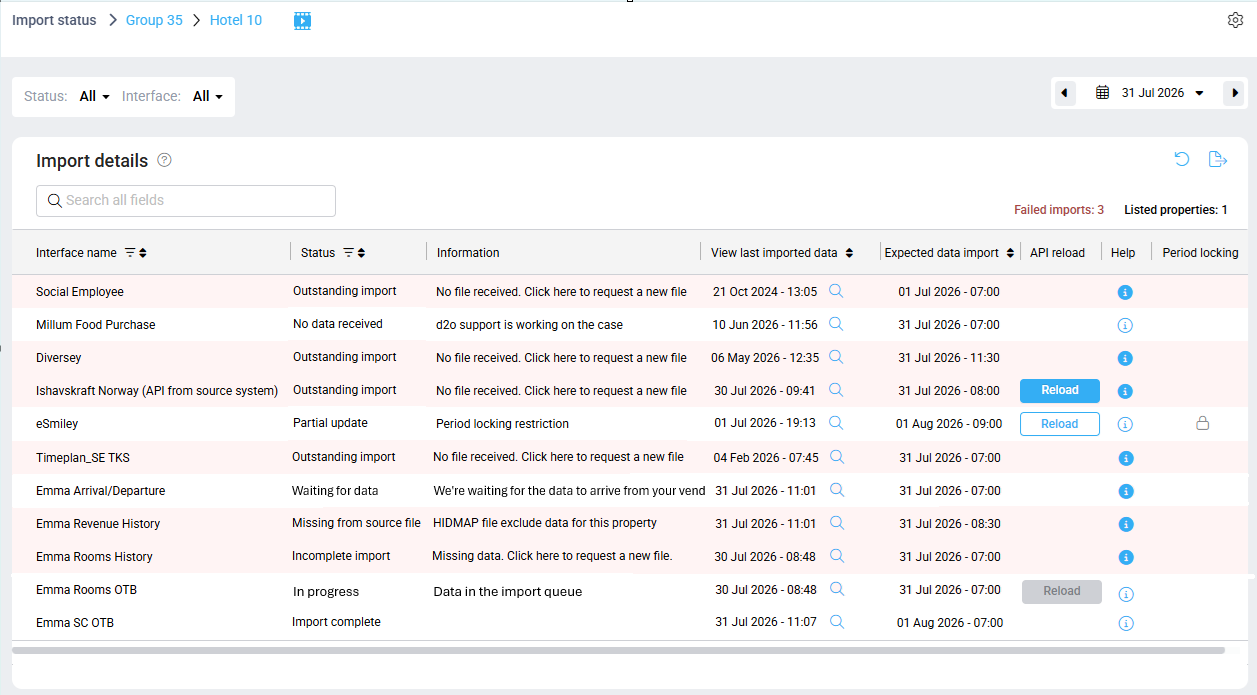
The Import status page has been enhanced to provide clearer import statuses and more accurate import timing information. These improvements make it easier to understand why an import requires attention and help users identify and resolve import issues more quickly.
Why is this useful?
- Makes import issues easier to understand with clearer status names.
- Helps distinguish between different types of import problems.
- Displays more accurate information about expected imports and recently imported data.
- Provides better control over which interfaces are monitored on the Import status page.
What has changed?
Clearer import statuses
Several status names have been updated to better describe the current import state.
New and updated statuses include:
|
Status |
Meaning |
|
Import complete |
Import completed successfully |
|
In progress |
Import is currently being processed in the import queue |
|
Waiting for data |
PMI is waiting for the import file |
|
Partial update |
Import completed but only partial update because some data was not imported in a locked period (GoGreen) |
|
Outstanding import |
No file was received |
|
Incomplete import |
The imported file are missing data |
|
Missing from source file |
The HIDMAP file fore several properties does not included data for this property |
|
No data received |
There was no successful import and d2o is working on the case |
Each status also includes a more descriptive explanation to help identify the cause of the issue.
Improved import timing
Import timing information has been updated to provide a clearer view of import activity.
- Expected data import now displays a more accurate expected date and time for the next import.
- View last imported data replaces Last import received and makes it easier to review the latest imported data.
Learn more
For more information, read: Import status – Understanding statuses