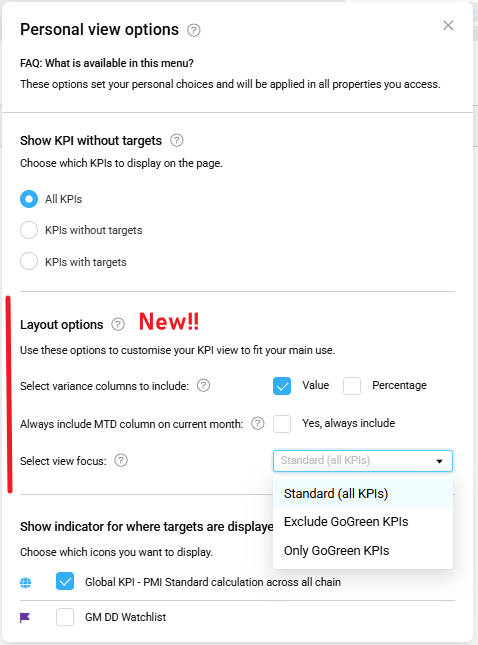

A new Layout options section has been added to Personal view options, allowing you to customise how KPI data is displayed. Your preferences apply automatically across all properties you can access.
Why this matters
You can choose how KPI variance is displayed, automatically include the Month-to-Date column, and start with the KPI view most relevant to your role.
What’s new
A new Layout options section has been added with three settings:
- Variance columns
Choose which variance columns appear in the KPI view:
-
- Value (numerical variance)
- Percentage (percentage variance)
- Always include Month-to-Date (MTD)
Preset whether the MTD column is automatically shown when viewing the current month.
- View focus
Set a default KPI focus, for example:
-
- Standard (all KPIs)
- A focused view such as Go Green KPIs
Your preferred view is applied automatically when opening the KPI page, but can still be changed at any time.
Who can use it
Available to users with access to the KPI Targets module.
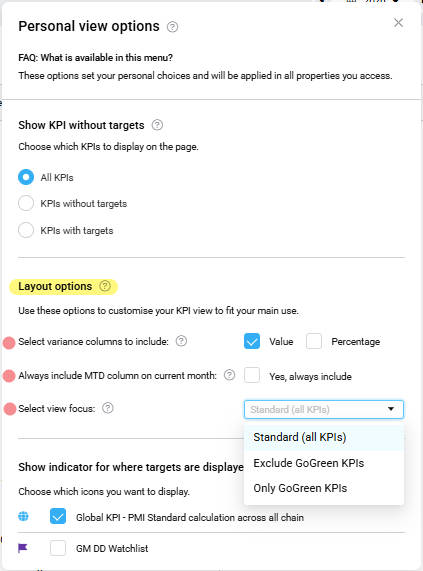
Image: New Layout in Personal view option